
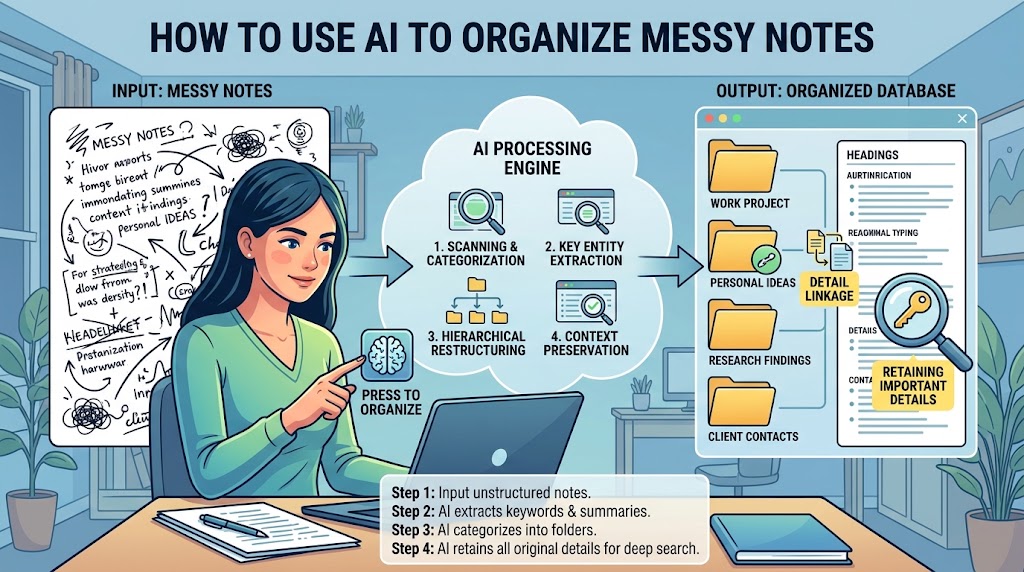
Messy notes are often more valuable than they look.
A page full of half-finished sentences, copied information, reminders, meeting comments, phone numbers, ideas, and random thoughts may be difficult to read, but it can contain details you cannot afford to lose.
That is where AI can be useful.
Instead of asking an AI tool to simply “clean up these notes,” you can use it as an organizing assistant. It can help identify topics, group related information, create headings, turn scattered tasks into a checklist, and make long notes easier to search.
The important part is what happens before and after the AI reorganizes the material.
AI can misunderstand a sentence, combine two unrelated points, turn uncertainty into a confident statement, omit a small detail, or interpret shorthand incorrectly. A polished result can therefore look better while being less accurate than the original.
The safest approach is to treat your original notes as the source of truth and the AI-generated version as an organized working copy.
Keep the Original Notes Before You Ask AI to Change Anything
The first rule is simple: do not replace your original notes with the AI version.
Make a copy first.
If your notes are in a document, duplicate the document. If they are in a notes application, export or copy them somewhere safe before experimenting. If you are working with several files, keep the originals together and create a separate folder for AI-organized versions.
This gives you something important: a reference point.
If you later discover that the AI removed a deadline or changed a number, you can compare the organized version with the original.
That is much safer than trying to remember what was originally written.
You should also give the files clear names. For example:
Project-Meeting-Notes-Original
and
Project-Meeting-Notes-AI-Draft
This small habit prevents an organized draft from accidentally becoming the only copy.
Decide What You Want the AI to Do
“Organize my notes” is a surprisingly vague instruction.
The AI has to decide what organization means, and that gives it more freedom to interpret your material.
Instead, tell it exactly what you want.
You might ask it to:
- group related points under clear headings
- separate tasks from general information
- extract dates and deadlines
- identify names and contact details
- create a list of decisions
- separate confirmed information from uncertain statements
- preserve the original wording of important facts
- identify questions that still need answers
The more specific the job, the easier it is to review the result.
For example, instead of saying:
“Clean these notes up.”
you could ask:
“Organize these notes into topics, decisions, tasks, deadlines, questions, and reference information. Preserve every date, number, name, and specific instruction. Do not invent missing information. If something is unclear, mark it as unclear rather than guessing.”
That gives the AI boundaries.
Start With Extraction Before Rewriting
One of the safest ways to use AI with messy notes is to divide the process into two stages.
First, extract the important information.
Second, organize the extracted information.
This is better than immediately asking the AI to turn your notes into a polished summary.
Suppose your notes contain:
“Call Sarah? maybe Friday. New quote 1,850? Need confirm if includes delivery. Mike said deadline moved to 14th. Check old contract before approving.”
A summary might accidentally turn the uncertain quote into a confirmed price or make Friday sound like a definite appointment.
An extraction request can instead ask the AI to preserve the uncertainty:
Potential contact: Sarah
Possible call: Friday — not confirmed
Quote: 1,850 — needs confirmation
Question: Does the quote include delivery?
Deadline: 14th — attributed to Mike
Task: Check old contract before approval
That is much closer to what the notes actually say.
Once you have that structured information, you can ask AI to turn it into a cleaner document.
Tell AI Which Details Must Never Be Dropped
Not every part of a note has equal importance.
A short number might be more important than an entire paragraph of explanation.
Before processing your notes, tell the AI which types of information must be preserved.
For example:
“Do not omit or change names, dates, times, prices, quantities, addresses, reference numbers, deadlines, action items, decisions, warnings, or statements about uncertainty.”
You can also tell it:
“If two pieces of information appear to conflict, keep both and flag the conflict instead of choosing one.”
That last instruction is particularly useful.
Imagine your notes contain:
“Meeting Tuesday 10am”
and later:
“Meeting moved to Wednesday 11am.”
A careless summary could mention only Wednesday.
A safer organization might show:
Original time: Tuesday, 10:00 AM
Later update: Moved to Wednesday, 11:00 AM
Current assumption: Wednesday, 11:00 AM, pending confirmation
The AI is organizing the evidence rather than quietly deciding what happened.
Ask AI to Preserve Uncertainty
Messy notes often contain words such as:
“maybe”
“probably”
“check”
“not sure”
“waiting for confirmation”
“someone said”
“might be”
Those words are not clutter.
They carry meaning.
Removing them can change the reliability of the information.
If your notes say that a delivery date is “probably next Monday,” the organized version should not say “delivery is next Monday.”
If someone suggested an idea but nobody approved it, the organized version should not label it a decision.
A useful instruction is:
“Preserve uncertainty exactly. Do not turn guesses, possibilities, suggestions, or unconfirmed information into facts.”
This is one of the most important safeguards when using AI for note organization.
Keep Facts Separate From AI Interpretation
AI can be helpful when it notices relationships between pieces of information, but you should know when it is interpreting rather than simply reorganizing.
Consider these two statements:
Original note:
“Talk to John about the laptop issue. Maybe replace battery?”
Safe organization:
Task: Talk to John about the laptop issue.
Possible option: Battery replacement.
A less careful AI could write:
Decision: Replace the laptop battery.
That is a completely different meaning.
For important notes, ask the AI to separate:
Facts
Tasks
Decisions
Suggestions
Questions
AI observations
This makes it easier to see where interpretation has entered the document.
Use a “Missing or Unclear” Section
Do not force AI to make sense of everything.
Some notes really are unclear.
Maybe you wrote:
“Ask them about the second one — probably same price?”
The AI does not know who “them” refers to or what “second one” means.
Instead of allowing it to guess, tell it to create a section such as:
Unclear or Needs Confirmation
- Who does “them” refer to?
- What does “the second one” refer to?
- Is the price confirmed?
- What date was being discussed?
This turns uncertainty into a useful follow-up list.
It also gives you an opportunity to resolve problems while the original context is still fresh.
Compare the Organized Version With the Original
Never assume that a well-written AI result is complete.
Read the organized version alongside the original notes.
You do not necessarily need to compare every sentence manually. Focus first on information that would cause a real problem if it disappeared or changed.
Check:
Names: Were people or organizations preserved correctly?
Dates: Did any deadline or appointment change?
Numbers: Were prices, quantities, measurements, codes, or reference numbers copied correctly?
Tasks: Are all action items still present?
Decisions: Did suggestions accidentally become decisions?
Questions: Are unresolved questions still visible?
Warnings: Did important cautions disappear?
Uncertainty: Did “maybe” become “will”?
This review is especially important when the notes are being used for work, projects, travel arrangements, purchases, technical procedures, or other situations where a small detail can matter.
Ask AI to Perform a Second-Pass Audit
You can use AI for verification without asking it to be the final authority.
After generating the organized version, provide the original notes again and ask for a loss check.
For example:
“Compare the original notes with the organized version. List every potentially missing, changed, merged, or newly interpreted detail. Pay special attention to names, dates, numbers, deadlines, tasks, decisions, and uncertainty. Do not rewrite the notes yet. Just report possible discrepancies.”
This is a different task from summarization.
The first pass organizes.
The second pass looks for what may have gone wrong.
You should still manually verify important discrepancies, but this approach can make the review much easier.
Do Not Upload Sensitive Notes Without Thinking About Privacy
Messy notes can contain much more personal information than people realize.
They might include phone numbers, addresses, passwords, account details, private conversations, customer information, work documents, financial information, or personal identifiers.
Before uploading anything, ask yourself:
Does the AI actually need this information to perform the task?
If not, remove it.
For example, instead of:
“Call Sarah Ahmed at 0300-1234567 about the client account.”
you may be able to use:
“Call [CONTACT] about the client account.”
The AI can still organize the task.
This is a form of data minimization: provide the information needed for the task rather than automatically providing everything contained in the original notes.
Be Careful With Passwords, Security Codes, and Secrets
Some information should generally not be pasted into an AI prompt simply because it appears in your notes.
That includes passwords, authentication codes, recovery codes, private encryption keys, API keys, and other credentials.
If you are organizing notes containing this type of information, remove or replace the secret before uploading the material.
For example:
API key: sk-xxxxxxxx
can become:
API key: [REMOVED]
The AI does not need the actual secret to organize the surrounding notes.
The same principle applies to private documents belonging to other people. If the AI does not need identifying information, remove it.
Check the AI Service’s Current Data Controls
Different AI services have different settings and policies, so do not assume that every tool treats uploaded notes in exactly the same way.
For example, OpenAI says that ChatGPT files are saved to Library when Library is available, and that how files and chats are used depends on account settings and data controls. OpenAI also says users can turn off “Improve the model for everyone” in Data Controls.
ChatGPT also provides Temporary Chat. OpenAI says Temporary Chats do not appear in chat history, do not create memories, and are not used to train models while they remain temporary; OpenAI may retain a copy for up to 30 days for safety purposes.
Google’s Gemini documentation similarly explains that uploaded files can be analyzed, while its privacy documentation says that when Keep Activity is enabled, chats and material shared with Gemini can be saved in Activity.
The practical lesson is simple: check the current privacy and retention settings of the AI service you are using before uploading sensitive notes.
Settings and product behavior can change, so use the provider’s current documentation rather than relying on an old article or assumption.
Break Very Large Notes Into Smaller Sections
More information is not always better.
If you give an AI system a huge collection of unrelated notes and ask it to organize everything at once, important relationships can become harder to track.
Google’s Gemini documentation specifically warns that very large uploads can produce results that miss connections or details scattered throughout the material and suggests using smaller files when appropriate.
A better approach is often to divide the material logically.
For example:
Project meetings
Customer notes
Personal tasks
Research notes
Ideas
Reference information
Organize each group first, then create a higher-level index.
This makes it easier to locate missing information and easier for you to verify the results.
Give AI a Structure Before You Give It the Notes
If you already know how you want your notes organized, tell the AI.
For example:
1. Important facts
2. Decisions
3. Tasks
4. Deadlines
5. People and organizations
6. Questions
7. Unconfirmed information
8. Reference material
This is often better than asking the AI to invent a structure.
You can change the categories depending on the type of notes.
For study notes, you might want:
Topics → Definitions → Examples → Questions → Review items
For meetings:
Attendees → Decisions → Tasks → Owners → Deadlines → Open questions
For research:
Source → Main claim → Evidence → Questions → Follow-up
The structure should serve the information rather than the other way around.
Do Not Let AI “Correct” Something It Does Not Understand
AI may notice spelling errors or incomplete sentences and try to correct them.
That can be helpful, but it can also be dangerous when a strange word is actually a name, product number, technical term, location, or abbreviation.
Suppose your notes contain:
“Ask Mark about PX-480.”
An AI system might treat “PX-480” as a typo.
If you know the term is important, explicitly tell the AI:
“Preserve unusual names, abbreviations, product codes, technical terms, and numbers exactly unless I ask you to correct them.”
This is particularly useful for technical notes.
Keep an Audit Trail for Important Work
For important projects, keep three versions:
Original
The untouched notes.
Organized draft
The AI-assisted version.
Verified version
The version you checked and approved.
This may sound excessive for a short grocery list.
It is not necessary for everything.
But for meeting records, research notes, project planning, technical procedures, client information, or important personal records, the distinction can be extremely useful.
It gives you a clear history of what the original material said and what changed during organization.
A Reusable Prompt for Safer Note Organization
You can reuse the following prompt with many AI tools:
Organize these notes without changing their meaning.
Preserve every important name, date, time, number, price, quantity, deadline, instruction, task, decision, warning, and reference.
Do not invent missing information.
Do not turn guesses, suggestions, possibilities, or unconfirmed statements into facts.
Preserve uncertainty such as “maybe,” “probably,” “needs confirmation,” and “not sure.”
Separate confirmed facts, decisions, tasks, questions, suggestions, and unclear information.
If two notes conflict, show both and flag the conflict instead of deciding which one is correct.
Preserve unusual names, abbreviations, technical terms, product codes, and reference numbers unless I specifically ask you to correct them.
If something is unclear, put it in an “Unclear or Needs Confirmation” section.
First extract important information. Then organize it into a clear structure.
After organizing the notes, provide a short “Potential Changes or Missing Details” section listing anything that may have been omitted, merged, interpreted, or changed.
Do not delete or replace the original information.
The important part of this prompt is not the exact wording. It is the workflow behind it.
You are telling the AI that accuracy comes before polish.
When You Should Not Rely on AI Alone
There are situations where AI should only be used for formatting or basic organization.
If a document contains information where a small mistake could have serious consequences, manually verify the important details.
That can include legal documents, medical instructions, financial records, security credentials, contracts, official deadlines, technical configuration information, or instructions involving safety.
AI can help you locate information inside such material, but finding something is not the same as confirming that it is correct.
For example, if AI extracts a deadline from a contract, check the original contract before acting on it.
If AI organizes medication-related notes, do not treat its organization as a replacement for the original instructions from a qualified professional.
The more consequential the information, the more important human verification becomes.
A Better Mental Model: AI as an Organizer, Not the Source of Truth
The easiest way to avoid many mistakes is to change how you think about the tool.
Do not think:
“AI will clean up my notes.”
Think:
“AI will help me organize information that I will continue to verify against the original.”
That difference matters.
AI is particularly good at tasks such as grouping related ideas, creating headings, extracting repeated themes, identifying possible action items, converting rough text into tables, and creating indexes.
But the original notes contain the evidence.
When the two disagree, the original should normally win unless you have independently confirmed the correction.
Final Thoughts
AI can turn a chaotic page of notes into something much easier to use, but the goal should not be to make the notes look perfect.
The goal is to make them clearer without losing information.
Start by preserving the original. Tell the AI exactly what needs to be retained. Extract important information before asking for a polished structure. Keep uncertain information marked as uncertain. Separate facts from interpretations. Remove sensitive information that the AI does not need. Then compare the organized version with the original before treating it as reliable.
For especially important notes, ask the AI to perform a second-pass audit for missing or changed details.
That workflow takes a little more effort than simply saying “summarize this,” but it solves the biggest problem with AI-assisted organization: a clean-looking document can hide mistakes.
The best result is not the shortest summary.
It is an organized version that remains faithful to the information you originally captured.
Sources and Further Reading
- OpenAI Help Center — File storage and Library in ChatGPT
- OpenAI Help Center — Temporary Chat FAQ
- OpenAI Help Center — Data Controls FAQ
- Google Gemini Help — Upload and analyze files
- Google Gemini Privacy Hub
Frequently Asked Questions
Can AI organize notes without changing them?
It can help organize them, but you should not assume that it will preserve every detail perfectly. Give explicit instructions to preserve names, numbers, dates, uncertainty, and other important information, then compare the result with the original.
Should I keep my original notes after using AI?
Yes. For anything important, keep the original. Treat the AI-organized version as a separate working copy until you have reviewed it.
How can I stop AI from making guesses about unclear notes?
Tell it not to guess and to create an Unclear or Needs Confirmation section. This is safer than allowing it to fill gaps based on assumptions.
Is it safe to upload private notes to an AI tool?
It depends on the information, service, account, and current privacy settings. Remove passwords, authentication codes, private keys, and unnecessary personal information before uploading anything. Check the service’s current data controls and retention policies as well. OpenAI and Google both provide settings and documentation describing how uploaded content and activity are handled.
Can AI check whether it accidentally removed information?
Yes. A useful second pass is to give the AI the original and organized versions and ask it to identify potentially missing, changed, merged, or newly interpreted information. Important discrepancies should still be checked against the original manually.
What is the safest way to use AI for important notes?
Keep the original untouched, minimize sensitive information, extract important details before summarizing, preserve uncertainty, separate facts from interpretation, verify the organized version, and manually confirm information before taking consequential action.